Admin Settings
Path: /admin
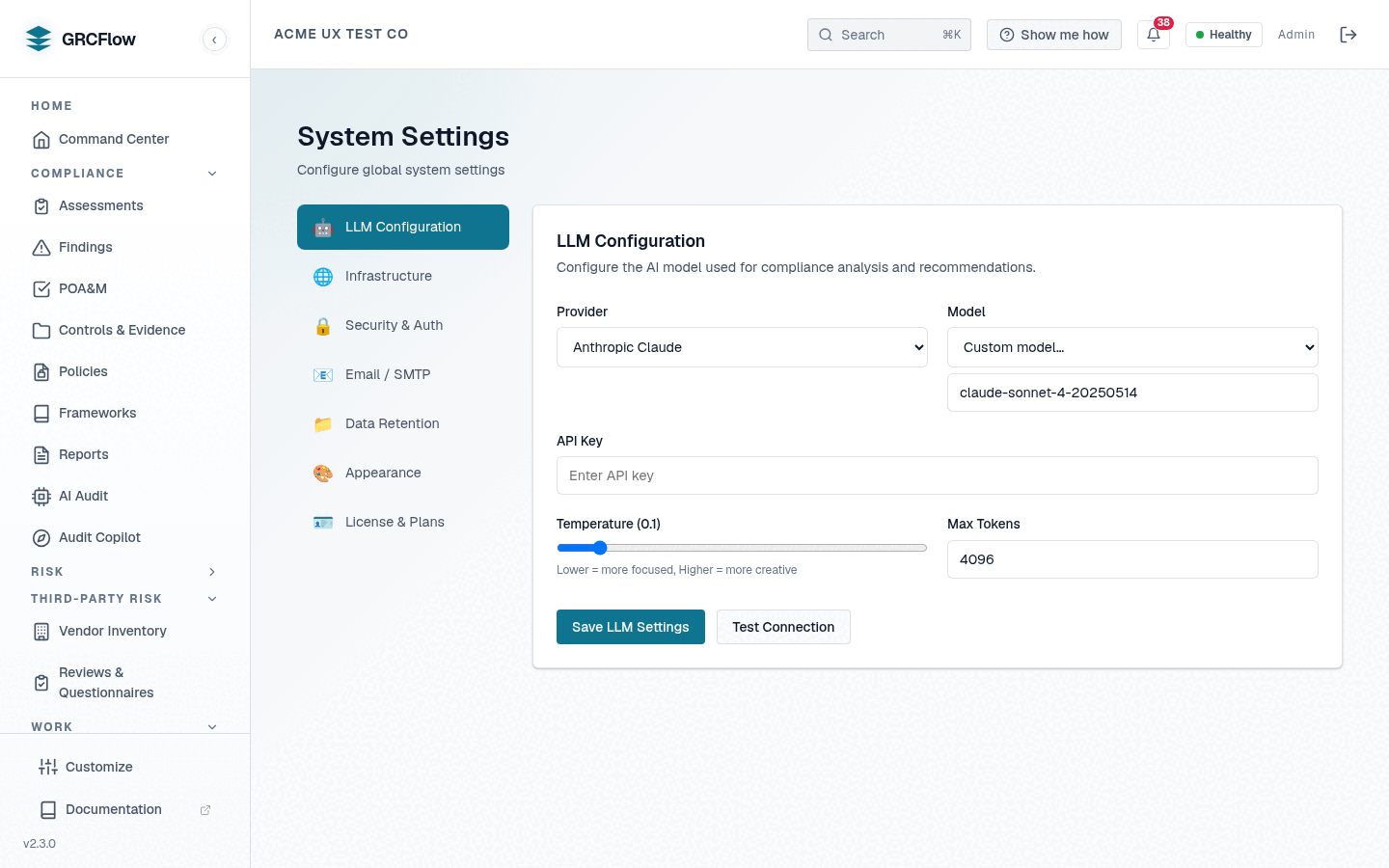
Advanced system configuration for administrators.
Configuration Sections
- Password Policy — Minimum length, complexity requirements, expiration.
- Security Settings — Session timeout, MFA enforcement, IP restrictions.
- UI Settings — Theme, default page, items per page.
- Data Retention — How long to keep audit logs, findings, and evidence.
- LLM Configuration — Configure the AI model provider from the UI (details below).
- SMTP Settings — Email configuration for notifications and alerts.
- Backup Settings — Database backup schedule and retention.
- License — View the current entitlement, and activate or update a license key without reinstalling (details below).
- Database Reset — Emergency reset with optional reseed (use with caution).
License
The License tab shows what this installation is actually entitled to right
now — status, plan/tier, organization, seats, deployment mode, and expiry — as
reported by the license service (the license-exempt GET /api/v1/setup/deployment-info
endpoint, so it works even when unlicensed).
Activate or update a license
Paste a signed license key into Activate or update license and click
Activate / update license. The key is verified locally against the
built-in Ed25519 public key (no internet required) via POST /api/v1/setup/license,
then persisted to /etc/sovereign-grc (the license_data volume). The new
entitlement takes effect immediately and the status panel refreshes.
Use this to:
- Apply a Professional / Enterprise key you were issued. The setup wizard's key field is only reachable during first-run, so this tab is where post-install keys go.
- Renew before or after expiry. An expired install still lets you reach the
License tab and paste a new key — login, setup, and the health check stay
available even when GRC endpoints return
403 license_required.
Editions (Community / Professional / Enterprise) ship the same binaries and
differ only in seats, term, and deployment mode; each plan row on the tab names
the exact backend gate that enforces it. Community is free and needs no key,
and it has no expiry cliff: its built-in licence is a rolling 90-day term
(LicenseService.COMMUNITY_TIER_DAYS) that is re-minted from the current time
on every backend restart, so a running install never expires out from under you.
Seat limits are enforced install-wide at user creation and invitation.
LLM Configuration
The LLM Configuration tab drives the platform's AI runtime directly — saved
settings are stored in the database, override the LLM_PROVIDER environment
configuration, and apply live with no backend restart.
- Provider — dropdown selection. Providers with a runtime client in this
build:
- NVIDIA NIM — hosted models via integrate.api.nvidia.com.
- Local / Self-hosted (Ollama/vLLM) — enter the Base URL of your
server's OpenAI-compatible endpoint (e.g.
http://localhost:11434/v1for Ollama). Private and localhost addresses are allowed. - OpenAI and Azure OpenAI — served through the same OpenAI-compatible client (Azure shows a Base URL field for your resource endpoint).
- Anthropic Claude — native Messages API client.
- Google Gemini and DeepSeek — served over their OpenAI-compatible endpoints.
- Cloudflare Workers AI — hosted inference via the Workers AI client.
- Model — a curated per-provider list plus a Custom model… free-text option, so a stale list never blocks you from a newer model id.
- API Key — stored encrypted at rest; once saved it is shown masked and never echoed back to the browser.
- Test Connection — probes the endpoint you configured
(
POST /api/v1/system/settings/llm/test) and reports success or the exact failure, so you can validate before running an assessment.
Anthropic, Gemini, DeepSeek and Workers AI need a key to take effect
Anthropic Claude, Google Gemini, DeepSeek and Cloudflare
Workers AI all have real runtime clients in this build
(AnthropicClient, GeminiClient, DeepSeekClient and WorkersAIClient
in src/backend/llm/client.py), and the admin-panel value routes to them
through _PROVIDER_MODE_MAP.
One deliberate guard applies: selecting Anthropic, Gemini or DeepSeek only
takes effect once a usable API key exists — either saved in the panel or
present in the environment. Without a key the saved provider is ignored and
the environment-configured provider stays authoritative, so a keyless
selection can never silently break AI features. SystemSettings.llm_provider
has always defaulted to anthropic, and this guard is what stops
long-lived installs that never configured a key from switching provider on
upgrade. See Bring Your Own Model.