Assessments
Path: /assessments
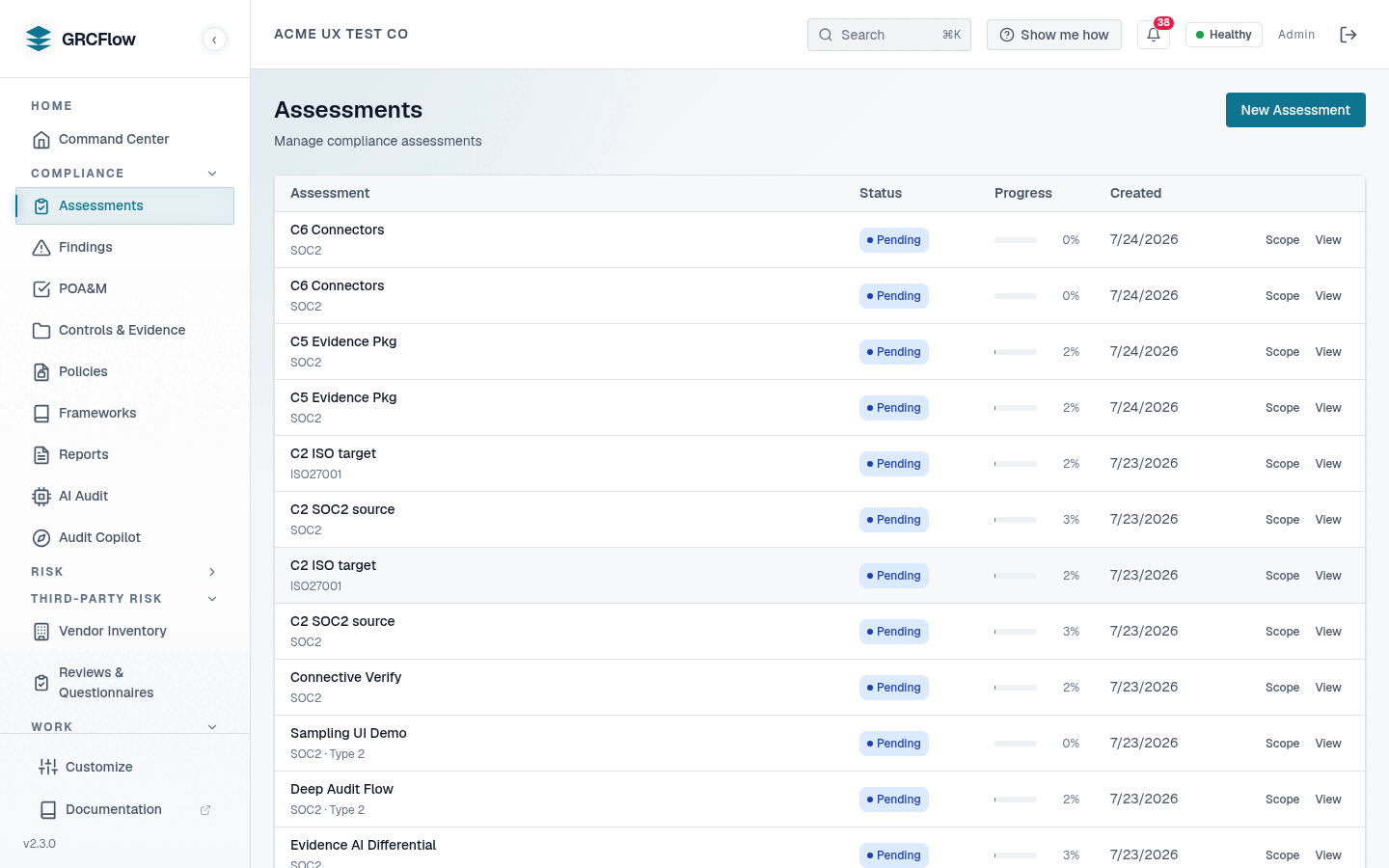
Assessments are the core workflow — they evaluate your organization against any of the 20 shipped compliance frameworks, from SOC 2 and ISO 27001 to NIST SP 800-53 Rev. 5, DORA, and the EU AI Act.
Key Elements
- New Assessment button (top right) — Start a new compliance assessment.
- Assessment table — Lists all assessments with name, framework, status, progress bar, and creation date.
- Status badges —
Completed(green),Pending(blue),In Progress(yellow). - Progress — Percentage of controls evaluated in that assessment.
- View — Click to open the assessment detail page.
How to Create an Assessment
- Click New Assessment.
- Select a framework — the picker is fed by the live
/api/v1/frameworkscatalogue, so all 20 shipped frameworks are selectable (see the Frameworks reference). - Name your assessment and click Create.
- The system will create findings for each control in the framework.
- Click Execute to run automated checks against connected infrastructure.
How to Review an Assessment
- Click View on any assessment row.
- The detail page shows each control, its status, and attached evidence.
- Mark controls as pass/fail and attach evidence or notes.
Scoping an Assessment
By default an assessment covers all controls in the selected framework.
When creating an assessment through the API
(POST /orgs/{org_id}/assessments), the optional controls list narrows the
run to specific controls:
An empty (or omitted) controls list means every control in the framework.
The selection is stored with the assessment and used on each execution.
Asynchronous Execution
Executing an assessment is non-blocking:
- The request returns immediately with
status: "running"— it does not wait for the (potentially multi-minute) evaluation to finish. - The
runningstate is committed to the database before the response is sent, so a status poll issued right after the call already seesrunning, and a client timeout or disconnect cannot roll the run back topending. - The evaluation continues in the background on the server; clients track it by polling:
The status response includes the persisted status
(pending / running / completed / failed), progress counts
(control_count, passing_count, failing_count), and — when the run failed —
a specific error message explaining why.
Re-execution guard
Only assessments in pending or failed state can be executed. Calling
execute on a running or completed assessment returns a 400 error, so
a double-click or retry cannot spawn a second concurrent run over the same
assessment.
Evidence: Live Checks and Documentation Review
For each control in scope, the workflow first tries to collect live technical evidence by running the control's configured queries against your connected infrastructure (via the Steampipe-based evidence collector).
When no live technical evidence source is reachable for a control — no
cloud integration configured, the collector unreachable, or the control has no
automated queries — the assessment does not silently skip the control. Instead
it falls back to a documentation review: it evaluates the control against
your organization's own in-force policy documents (status active or
approved) whose covered-controls list includes that control, and produces a
verdict from those policies. Up to the first 8,000 characters of each matching
policy's content are provided to the analyzer.
Documentation-review verdicts are explicitly marked as such — the evidence
carries the documentation_review evidence type and a note that this is a
documentation-level review, not a live technical verification — so you can
calibrate confidence accordingly when reviewing findings.
Run a full audit with zero cloud integration
Documentation-review fallback is enabled by default. A brand-new security or compliance officer with no cloud integration at all can run the entire audit against the policies they maintain in the Policies module — and every resulting verdict is clearly labeled as a documentation review rather than a live technical check.
Draft policies do not count
Only policies in active or approved status are used for documentation
review. Draft policies are excluded — a control covered only by a draft
policy stays an honest gap instead of being papered over by an unapproved
document.
The document-relevance gate
Before grading anything, the analyzer first decides whether the reviewed
document is actually about the control's topic. A document that is
off-topic, the wrong kind of document entirely (a résumé, an invoice, a
marketing page, a policy for an unrelated domain), or contains too little
substantive content to evaluate is recorded with evidence_relevant=false
and a stated reason, and the finding asks for the correct document to be
re-uploaded.
An irrelevant document is never treated as a verdict in either direction: it is not evidence of compliance, and it is not proof of a gap — no gap is recorded and no consensus pass runs. The relevance judgment is made by the same LLM analyzer, so treat it as a strong filter, not an infallible one: review the stated reason, and re-run the evaluation after uploading a document that addresses the control.
Honest Result States
An assessment never fakes a green completion. When the background run finishes, a health check decides the terminal state:
completed— at least one control received a genuine AI verdict (a real model evaluated it; offline template fallbacks and unparsed responses do not count). A framework whose in-scope controls are purely manual — nothing to auto-evaluate and no collection or analysis errors — also completes, with those controls routed to manual review rather than marked passing.failed— zero controls received a real verdict because something in the pipeline was broken. The assessment is markedfailedwith a specific, actionableerror_messageinstead of reporting an empty "completed / 100%" run. The message distinguishes the cause:- evidence was collected but the AI analyzer produced no verdict (LLM provider not reachable or not configured),
- evidence collection failed for all controls (evidence source unreachable),
- the analyzer errored with no evidence gathered.
Execution exceptions and server restarts/shutdowns during a run are also
recorded as failed with an explanatory message, so a run never sticks at
running forever.
The failure reason is surfaced on the assessment itself (error_message) and
in the error field of the status endpoint. A failed assessment can be
re-executed once the underlying issue (for example, the LLM provider
configuration — see AI Audit prerequisites) is fixed.